1. Upload and settings
Use JPG or PNG for the best result.
Original photo
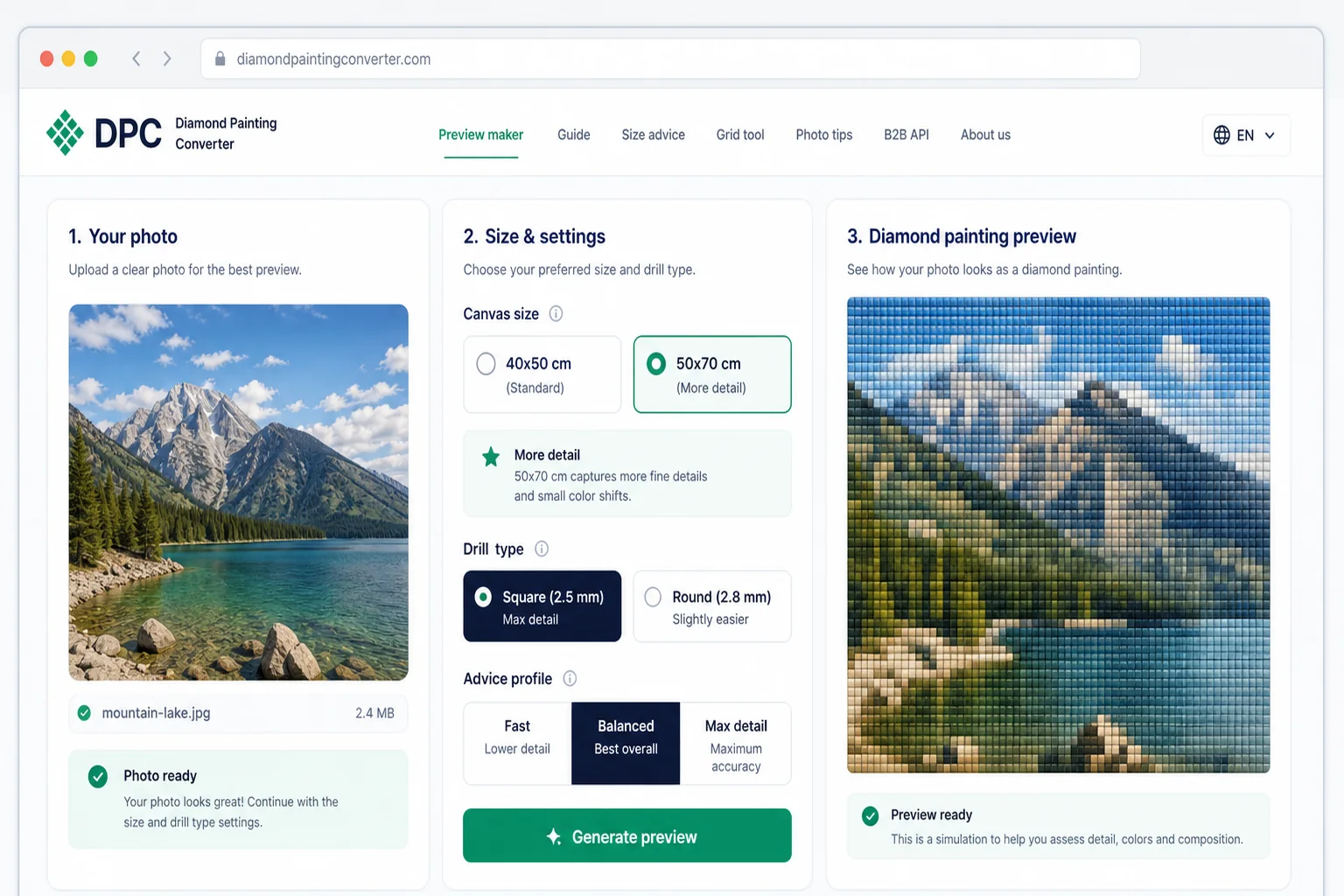
Diamond painting preview

Want to fine-tune the colors yourself? Try the free Pattern Studio →
Upload a photo, choose your width in centimetres, and compare diamond painting preview variants before you order or build a custom product flow.
Edit DMC colors in the pattern editor, or print the free DMC color chart. A personal PDF pattern is a paid download.
Use JPG or PNG for the best result.
Original photo
Diamond painting preview
Want to fine-tune the colors yourself? Try the free Pattern Studio →
Upload your photo and receive a complete overview instantly.
Diamond painting preview
Realistic simulation of how your photo looks as a diamond painting
Automatic size advice
Recommended, average and minimum size based on your photo
Quality score per size
Compare 5 variants and choose the size that matches your expectations
Square vs. round comparison
See the difference between drill types for your specific photo
Free and unlimited · No account needed

Ro.

Nm.

Am.

Kr.

Ad.
Upload a photo and the pattern maker turns it into a real diamond painting chart: a symbol grid, a DMC color list and the exact drill count per color. The preview is free and you don't need an account.
Everything runs in your browser, on your laptop but also on Android and iPhone. There is nothing to install: the tool is the software. Handy if you want to turn a photo you just took into a pattern right away.
Happy with the preview? Download the print-ready PDF pattern with symbol chart and color list for €8.95, or order the complete kit from €29.95 with canvas, drills and tools shipped to your door. You pick round or square drills and the size — the size guide shows how many drills each format holds.
This page shows you what your photo looks like as a diamond painting. If you want to change what is in the pattern, open the Pattern Studio: it shows the real DMC chart, lets you merge two shades that are almost identical and prints an A4 symbol chart. And if you only need the codes, the DMC color chart lists all 454 shades for free.
Why this exists
A photo on a screen is smooth. A diamond painting is a grid of drills, and every one of them is a square of flat colour. Whether a face survives that depends on how many drills fit — and that is decided by the size you order.
So this shows you the grid before you buy anything. Not an artist impression: your photo reduced to the actual drills, at the size you are considering.
Order too small and the eyes disappear. That is the mistake this is here to prevent.
Choose a JPG or PNG of your own photo, pet, landscape or artwork
Set the width in centimetres and select square or round drills
Receive a realistic preview, size advice and quality score per size
Our tool converts your photo into a realistic diamond painting simulation. You upload a photo, choose the desired width in centimetres and the drill type, and within seconds you see the result. The generator takes into account the number of drills per centimetre, the colour reduction inherent to diamond painting, and the pixel density of your chosen size.
In addition to the preview, you automatically receive size advice. The tool analyses the complexity of your photo and calculates at which size your photo is shown to best effect. You get a recommended size, a minimum acceptable size and a quality score per dimension. So you know exactly which size matches your expectations.
Many diamond painting pattern makers jump straight to a printable chart. This tool is built for the step before that: check whether your photo still works as diamond art, compare square and round drills, estimate the drill count, then use the grid overlay and size guide before you order or create a final pattern.
The right diamond painting size depends on the details in your photo. A portrait needs more drills than a simple landscape. Our tool calculates the optimal size based on your specific photo.
Read more about suitable photos → Choose the right size for your photo →Square drills (2.5 mm) give a crisp mosaic result. Round drills (2.8 mm) are easier to place and give a softer effect. The preview shows the difference so you can make an informed choice.
View the grid on your photo →Choose between Fast, Balanced and Max detail. Each profile weighs speed and detail retention differently. For most photos Balanced is the best choice, but for complex portraits Max detail can make the difference.
More and more people want to make a diamond painting from their own photo. Whether it's a portrait of your children, a photo of your pet, a wedding photo or a favourite holiday landscape: with a custom diamond painting you turn a personal memory into a unique artwork that you make with your own hands.
If you already know which photo you want to use, start with the photo size guide before ordering. It explains when 30x40 cm is too small, when 40x50 cm is enough and why portraits need more canvas than simple landscapes.
Before ordering a personalised diamond painting, it's important to know how your photo looks as a mosaic of drills. Not every photo works equally well: fine details can be lost at a small size, and dark photos with little contrast often produce a less recognisable result. Our preview generator shows you this for free and instantly, so you make an informed choice before ordering.
A custom diamond painting is also a popular gift idea. With our tool you can check in advance whether the photo is suitable and which size gives the best result. This way you avoid disappointments and know for sure that your gift looks beautiful.
The number of drills in a diamond painting depends on the size and drill type. With square drills of 2.5 mm there are 4 drills per centimetre, i.e. 16 drills per square centimetre. With round drills of 2.8 mm there are about 3.6 per centimetre, i.e. 13 per square centimetre.
| Size | Square (2.5 mm) | Round (2.8 mm) |
|---|---|---|
| 30 x 30 cm | 14.400 | 11.700 |
| 40 x 50 cm | 32.000 | 26.000 |
| 50 x 60 cm | 48.000 | 39.000 |
| 60 x 80 cm | 76.800 | 62.400 |
| 80 x 100 cm | 128.000 | 104.000 |
A larger size means more drills and therefore more detail, but also more time to complete. A diamond painting for beginners is ideal in size 30x40 or 40x50 cm: large enough for a recognisable result, but not so large that it becomes overwhelming. Experienced diamond painters often choose 60x80 cm or larger for maximum detail.
Want to see exactly how the drills are distributed across your photo? Use our grid overlay tool to place a grid over your photo and assess the distribution.
For stores and product builders, the same drill-count logic can support a custom product flow. The diamond painting preview API is the route for webshop use; this public page stays focused on the free photo check.
Photos with high contrast, bright colours and clear shapes work best. Avoid photos that are very dark or contain lots of tiny details. Check our photo tips.
If you're just starting with diamond painting, choose a size of 30x40 or 40x50 cm. This way you learn the technique without the project taking months. Our tool shows which size is minimally needed.
Our preview generator shows five variants side by side. This way you can instantly see the difference in detail and quality between sizes. The quality score helps you choose the optimal size.
With our grid overlay tool you place a grid over your photo. This way you can see exactly which details are preserved and which are lost at your chosen size.
Upload your photo via the form above, set the desired width with the slider and choose your drill type. Click 'Generate layout' and you'll instantly see a preview. The tool generates five variants at different sizes so you can compare.
Yes. Upload the picture above and you get a free diamond art preview with size advice, drill type comparison and quality scores. Start with the photo size guide if you are choosing between 30x40, 40x50 or a larger canvas.
Yes, you can use any photo. Upload a JPG or PNG and our tool instantly shows how it looks as a diamond painting. Popular choices are portraits, pets, wedding photos, holiday photos and artworks. Not every photo works equally well; use our photo tips to make the best choice.
Yes. Use the free preview to settle on a size, then download the print-ready PDF for € 8,95: the symbol chart, the full DMC colour list and the drill count per colour. Rather have it all delivered? The complete kit ships with canvas, drills and tools.
That depends on the details in your photo. A portrait with fine facial features needs at least 40x50 cm, while a landscape with large colour areas can work well at 30x40 cm. Our tool calculates this automatically and gives a quality score per size.
That depends on the size and drill type. With square drills (2.5 mm) there are 16 per cm², with round drills (2.8 mm) about 13 per cm². A 40x50 cm canvas with square drills contains about 32,000 drills. Larger sizes offer more detail but take more time.
Square drills (2.5 mm) fit seamlessly together for a crisp, mosaic-like result with maximum detail. Round drills (2.8 mm) are slightly larger, easier to place and give a softer, more organic effect. For photo details, square drills generally work better.
For beginners we recommend a size of 30x40 cm or 40x50 cm. This is large enough for a recognisable and beautiful result, but not so large that it becomes overwhelming. Choose round drills if you're just starting out; they are easier to place. Our tool shows a quality score per size so you know what to expect.
The time depends on the size, number of colours and your experience. A small 30x30 cm canvas takes an average of 8-15 hours. A medium 40x50 cm canvas takes 20-40 hours. Large canvases of 60x80 cm or more can take 60-100+ hours. Most people work on it as a relaxing hobby, a few hours at a time.
Yes, the Diamond Painting Preview Generator is completely free. You can upload unlimited photos and generate previews. No account needed. For webshop owners who want to integrate the preview functionality, we offer a B2B API.
This page is one. It is a free online tool that runs in the browser: upload an image, and the converter shows it as diamond art with the drill grid over it, at every size we support. You do not need an account and nothing is installed. Only the printable chart and the physical kit cost money.
You get a printed canvas covered in a sticky grid, where every cell has a symbol for one colour. You place a small resin drill on each cell with a pen, and the picture appears as the grid fills up. It is closer to cross stitch than to painting - nothing dries, nothing can smudge.
Here: €8.95 for the printable PDF chart of your own photo, and €29.95 to €99.95 for a complete kit with printed canvas, the drills for every colour and the tools, with free shipping. The kit price follows the longest side: €29.95 up to 30 cm, €39.95 up to 40 cm, and so on up to €99.95 for a metre.
Upload a photo in the Pattern Studio. It matches every cell against 454 DMC colours, shows the real chart, and lets you merge shades or replace a colour by hand before you print. Designing and editing are free; only the printable chart costs money. Open the Pattern Studio to start.
Make something small from what you already have. In the Pattern Studio you lower the colour count until the pattern only uses codes from your own stock, then swap any remaining colour by hand. Card-sized patterns are the realistic ones for leftovers. Open the Pattern Studio to start.
Peel back only a corner of the protective film so the glue does not collect dust, work one colour at a time, and press each finished area flat with the back of a book. The step-by-step guide walks through the whole routine. The step-by-step guide walks through the whole routine.
Almost any photo works. Sharp photos with good contrast give the nicest pattern. Faces need at least 40x50 cm, otherwise details vanish — check the size guide before you order.
The preview is free, without an account. You only pay if you want the print-ready PDF pattern (€8.95) or a complete kit.